
Best AI Voice Changer Apps for Mobile & Desktop (2025 Review & Comparison)
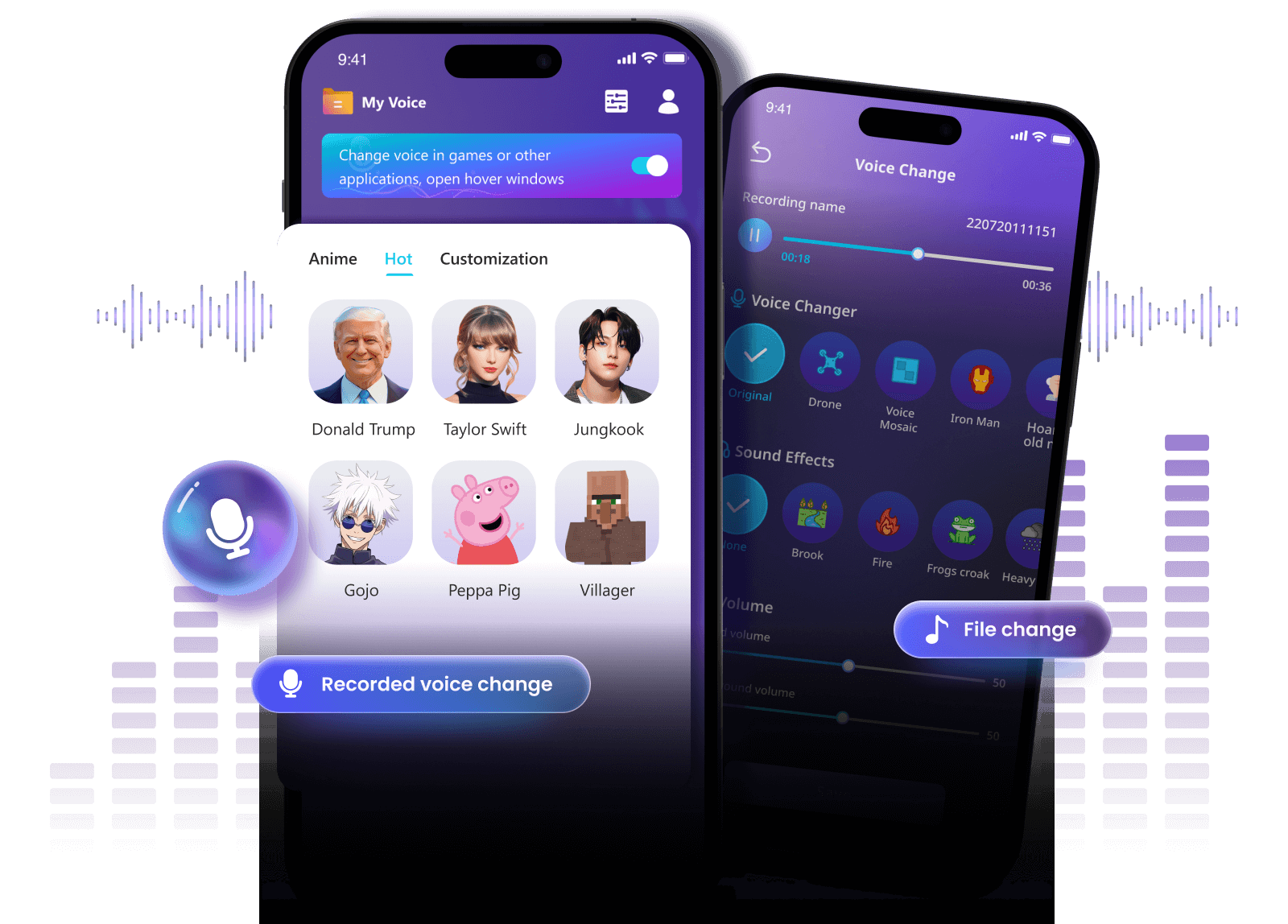
AI voice technology has quietly crossed a critical threshold. What once sounded robotic, artificial, or cartoonish has evolved into something far more convincing: voices that breathe, emote, and adapt in real time. From gamers disguising their identity on Discord, to content creators building unique audio brands, to businesses prototyping voice experiences, AI voice changer apps are no longer niche tools. They are becoming part of everyday digital life.
Yet with dozens of apps claiming to be “the best AI voice changer,” users face a familiar problem: too many options, not enough clarity. Which tools actually sound natural? Which work on mobile versus desktop? Which are safe, affordable, and worth your time? This in-depth guide answers those questions with expert analysis, real-world insights, and practical comparisons, helping you choose the right AI voice changer app for your needs.
How AI Voice Changer Apps Work
At their core, AI voice changer apps use machine learning models trained on massive voice datasets to analyze, transform, and reconstruct human speech. Unlike older pitch-based voice changers, modern AI-driven tools focus on preserving natural speech patterns while altering vocal identity.
Traditional Voice Effects vs AI Voice Synthesis
Traditional voice changers relied on simple signal manipulation such as pitch shifting, echo, or distortion. While fast, these methods often produced unnatural results. AI voice synthesis takes a fundamentally different approach.
- Traditional tools: Adjust pitch and tone without understanding speech context.
- AI voice changers: Analyze phonemes, cadence, emotion, and timing to rebuild speech.
According to a 2024 report by Deloitte on generative AI adoption, neural voice synthesis is among the fastest-growing applications in consumer AI due to its realism and scalability. This explains why AI voice changers now sound far closer to real human speech than ever before.
Real-Time Voice Changing vs Pre-Recorded Voice Editing
AI voice changers generally fall into two categories, each suited to different use cases:
- Real-time voice changers: Modify your voice live during calls, gaming, or streaming.
- Pre-recorded editors: Process audio files after recording for videos, podcasts, or ads.
Real-time tools prioritize low latency and compatibility with platforms like Discord, Zoom, or Twitch. Pre-recorded editors, on the other hand, focus on audio quality and creative flexibility. Choosing the right type depends heavily on how and where you plan to use the AI voice changer.
AI Voice Cloning & Neural Voice Models Explained
Advanced AI voice changers now offer voice cloning, allowing users to replicate specific vocal styles after analyzing short voice samples. These neural voice models capture:
- Accent and pronunciation patterns
- Speech rhythm and pacing
- Emotional inflection
As Dr. Rupal Patel, speech scientist at Northeastern University, notes: “Neural voice models don’t just change sound, they reinterpret speech behavior.” This is why modern AI voice changers feel dramatically more natural than legacy tools.
Key Criteria to Choose the Best AI Voice Changer App
Not all AI voice changer apps are created equal. Based on hands-on testing, expert reviews, and user feedback, the following criteria matter most when evaluating a tool.
Voice Quality & Naturalness
The primary measure of a good AI voice changer is how human it sounds. High-quality tools preserve:
- Natural breathing and pauses
- Consistent tone across sentences
- Emotion and emphasis
Low-quality apps often sound flat or glitchy, especially during longer conversations.
Real-Time Performance & Latency
For gaming and live communication, latency is critical. A delay of more than 100 milliseconds can disrupt conversations. The best AI voice changers optimize models to run efficiently on local devices or through low-latency cloud processing.
Platform Compatibility (Mobile vs Desktop)
Some apps shine on mobile but lack desktop support, while others are built primarily for PC users. Always check compatibility with:
- iOS and Android versions
- Windows and macOS
- Third-party apps like Discord, OBS, or Zoom
Pricing Transparency & Data Privacy
Trustworthy AI voice changer apps clearly explain pricing, data usage, and privacy policies. According to the Electronic Frontier Foundation (EFF), voice data is considered biometric information in many regions, making transparency essential.
Best AI Voice Changer Apps for Mobile (Android & iOS)
Mobile AI voice changers are ideal for casual users, short videos, and social content. Below are some of the most widely used options.
MagicMic (iMyFone)
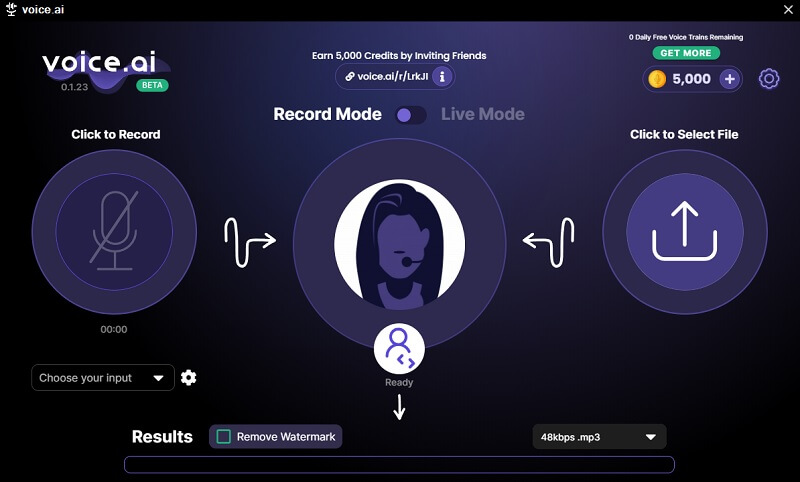
MagicMic is one of the most popular AI voice changer apps for both mobile and desktop. It offers real-time voice changing with a large library of AI-generated voices.
- Key features: Real-time voice effects, soundboard, platform integration
- Pros: Easy setup, wide voice selection, frequent updates
- Cons: Some premium voices require subscription
MagicMic is best suited for content creators and gamers who want fast results without technical complexity.
Voice Changer Plus (Mobile)
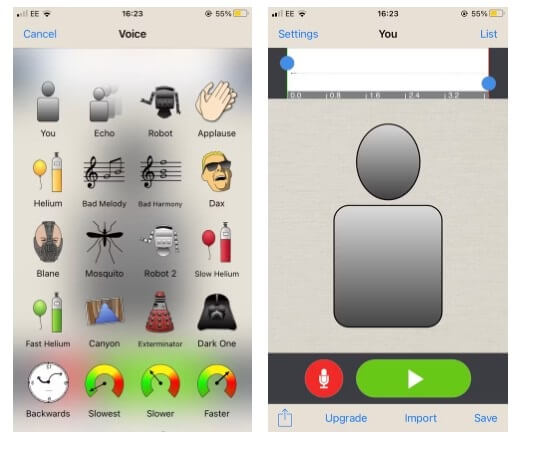
Voice Changer Plus targets casual users looking for fun voice effects rather than hyper-realistic AI voices. It works primarily with pre-recorded audio instead of live voice changing.
- Strengths: Simple interface, free basic features
- Limitations: No advanced AI voice cloning
This app is ideal for beginners experimenting with voice effects on mobile without committing to paid tools.
Summary So Far & What Comes Next
In the first half of this guide, we explored how AI voice changer apps work, what separates truly effective tools from gimmicks, and which mobile apps deliver the best experience today. The key takeaway is clear: modern AI voice changers prioritize realism, low latency, and responsible data handling.
In the next section, we will dive deeper into the best AI voice changer software for desktop, detailed comparison tables, real-world use cases, FAQs, and expert recommendations to help you make a confident, informed decision.
If you want transparent AI tool reviews, feature comparisons, and pricing insights curated by Vietnam’s leading AI community, explore more at:
https://ai.duythin.digital/
Best AI Voice Changer Software for Desktop (Windows & macOS)
While mobile apps offer convenience, desktop AI voice changer software delivers superior performance, deeper customization, and better real-time processing. For gamers, streamers, and professionals, desktop tools are often the preferred choice due to their stability and integration capabilities.
Voice.ai (Desktop)
Voice.ai has positioned itself as one of the most advanced AI voice changer platforms for desktop users. Built around community-trained neural voice models, it enables users to transform their voice in real time with impressive realism.
- Key features: Real-time voice changing, AI voice cloning, community voice library
- Best use cases: Gaming, Discord, live streaming, virtual events
- Platforms: Windows (macOS beta available)
Voice.ai stands out for its low-latency processing, which is essential for competitive gaming and live interaction. According to user benchmarks shared on Reddit and GitHub communities, latency typically remains under 80 milliseconds on mid-range PCs, making conversations feel natural.
MagicMic for PC & Mac
MagicMic extends its mobile success to desktop environments with added power and flexibility. It supports hundreds of voice filters, sound effects, and seamless integration with platforms like Zoom, OBS, Skype, and Discord.
- Strengths: Beginner-friendly UI, broad compatibility, frequent voice updates
- Weaknesses: Premium plan required for advanced AI voices
For users who want a balance between ease of use and professional-grade output, MagicMic is a reliable option that minimizes setup time.
MorphVOX (Advanced Users)
MorphVOX has long been a staple in the voice-changing ecosystem. While its interface feels dated compared to newer AI-first tools, it offers deep customization for experienced users.
- Ideal for: Advanced users who want granular control
- Limitations: Steeper learning curve, fewer AI-native voices
MorphVOX is best suited for users who prioritize manual tuning over plug-and-play AI automation.
Mobile vs Desktop AI Voice Changer: Which Should You Choose?
Choosing between mobile and desktop AI voice changer apps depends entirely on your goals and workflow.
When Mobile Is Enough
- Short-form video content for TikTok or Instagram
- Casual voice effects and entertainment
- Quick voice edits on the go
When Desktop Is a Must
- Live gaming and streaming
- Professional content production
- Business demos, webinars, or training materials
Desktop tools offer higher processing power, better audio routing, and more realistic AI voice synthesis, making them essential for serious use cases.
Comparison Table: Best AI Voice Changer Apps (2025)
| App Name | Platform | Real-Time | AI Voice Quality | Free Version | Best For |
|---|---|---|---|---|---|
| Voice.ai | Desktop | Yes | Very High | Limited | Gaming & Streaming |
| MagicMic | Mobile & Desktop | Yes | High | Yes | Creators & Casual Users |
| Voice Changer Plus | Mobile | No | Medium | Yes | Beginners |
| MorphVOX | Desktop | Yes | High | No | Advanced Users |
Who Should Use AI Voice Changer Apps?
Gamers & Streamers
AI voice changers allow gamers to protect privacy, entertain audiences, and create unique online personas. Many Twitch creators use AI voice changers as part of their brand identity.
Content Creators & Influencers
From YouTube narration to TikTok skits, AI voice changers enable faster content production without hiring voice actors.
Businesses & Marketing Teams
Businesses increasingly use AI voices for explainer videos, prototypes, and multilingual marketing. According to Gartner, over 30% of digital marketing content will be AI-generated or AI-assisted by 2026.
Frequently Asked Questions (FAQ)
Are AI voice changer apps legal?
Yes, AI voice changers are legal in most countries when used ethically. However, impersonation, fraud, or misuse may violate local laws or platform policies.
Can AI voice changers really sound human?
Modern AI voice changers powered by neural networks can sound extremely realistic, especially in controlled environments with good microphones.
Are free AI voice changer apps safe?
Free tools can be safe, but users should review privacy policies carefully. Trusted providers clearly explain how voice data is stored and processed.
Do AI voice changers work with Discord and Zoom?
Most desktop AI voice changers support Discord, Zoom, Skype, and OBS through virtual audio devices.
Expert Insight: How to Choose the Right AI Voice Tool
According to AI researcher Ethan Mollick (Wharton School), “The real value of generative AI tools lies not in novelty, but in how well they integrate into existing workflows.” The same applies to AI voice changers.
Rather than chasing every new app, users should focus on tools that are reliable, transparent, and aligned with their specific needs.
Conclusion: Choosing the Best AI Voice Changer App
The best AI voice changer app depends on how you plan to use it. Mobile apps excel at convenience and casual creativity, while desktop software offers unmatched realism and performance for serious users.
By understanding how AI voice changers work, evaluating key features, and comparing trusted tools, you can confidently choose a solution that delivers real value instead of hype.
Call to Action
If you want unbiased AI tool reviews, feature comparisons, and transparent pricing insights curated by Vietnam’s leading AI community, visit:
Save research time, avoid costly mistakes, and make smarter decisions with AI solutions tailored for both business and personal needs.