
How to Use AI Voice Changer on Zoom & Google Meet
Remote meetings have become the backbone of modern work, education, and collaboration. Yet not everyone is comfortable using their real voice in every situation. Some worry about privacy, others want to sound more confident, professional, or simply more engaging. This is where an AI voice changer on Zoom & Google Meet steps in as a surprisingly practical solution.
Thanks to rapid advances in artificial intelligence, voice changing technology is no longer a gimmicky “robot filter.” Today’s AI-powered voice changers can modify tone, pitch, accent, and even speaking style in real time, all while preserving natural speech quality. In this in-depth guide, we explore how AI voice changers work, why professionals and creators are using them, and how you can set one up correctly on Zoom and Google Meet.
This article is written from hands-on experience and deep research, with insights drawn from real-world usage and expert commentary. Whether you are a business owner, remote worker, educator, or content creator, you will leave with practical knowledge you can actually apply.
What Is an AI Voice Changer and How Does It Work?
Definition of an AI Voice Changer
An AI voice changer is a software tool that uses machine learning algorithms to transform a user’s voice into another voice or style in real time. Unlike traditional voice effects that simply raise or lower pitch, AI voice changers analyze speech patterns, intonation, rhythm, and pronunciation to generate a more realistic output.
In practical terms, when you speak into your microphone, the AI processes your voice instantly and outputs a modified version that sounds natural to listeners on Zoom or Google Meet. This happens fast enough that conversations still feel live and interactive.
Core Technologies Behind AI Voice Changers
Modern AI voice changers rely on several advanced technologies working together:
- Deep Learning Models: Neural networks trained on thousands of voice samples learn how human speech works.
- Voice Synthesis: AI recreates speech with new tonal characteristics while keeping clarity.
- Real-Time Audio Processing: Low-latency systems ensure minimal delay during live meetings.
According to a 2024 report by Gartner, over 60 percent of enterprise communication tools now integrate some form of AI-driven audio enhancement, highlighting how mainstream this technology has become.
Real-Time Voice Processing Explained
Real-time voice changing is what makes these tools usable on Zoom and Google Meet. The AI creates a virtual microphone on your system. Zoom or Google Meet then “listens” to this virtual microphone instead of your physical one.
When configured correctly, the delay is often less than 50 milliseconds. In user testing, this is below the threshold most people can consciously detect, meaning conversations remain smooth and professional.
Why Use an AI Voice Changer on Zoom & Google Meet?
Business and Professional Use Cases
For businesses, an AI voice changer on Zoom & Google Meet can solve real communication challenges. Sales teams may want a consistent brand voice for demos. Customer support teams can protect employee privacy. Trainers can simulate different customer scenarios during role-play sessions.
A remote sales manager interviewed by Forbes noted: “Using AI voice modulation helped our junior reps sound more confident on international calls. The difference in engagement was immediate.”
Personal and Creative Use Cases
Beyond business, individuals are using AI voice changers for:
- Online teaching and storytelling
- Live streaming and content creation
- Protecting identity in public or large meetings
Educators, in particular, report higher student attention when varying voice tone during long online classes. This aligns with cognitive studies showing vocal variation improves listener retention.
Functional Versus Entertainment Purposes
While some people associate voice changers with entertainment, the professional applications are growing faster. In 2025, functional use cases like privacy, branding, and accessibility far outweigh novelty effects, especially in enterprise environments.
Is It Safe and Legal to Use AI Voice Changers in Online Meetings?
Privacy and Ethical Considerations
Using an AI voice changer is generally legal, but ethical usage matters. Transparency is key. In professional settings, it is best practice to inform participants if your voice is being modified, especially in recorded meetings.
From a privacy standpoint, reputable AI voice changer tools process audio locally on your device, reducing the risk of data leakage. Always review the tool’s privacy policy before use.
Zoom and Google Meet Compatibility Rules
Neither Zoom nor Google Meet explicitly forbids AI voice changers. Both platforms allow third-party audio input devices, including virtual microphones. As long as the software does not violate security policies or disrupt meetings, it is typically permitted.
Best Practices to Avoid Misuse
- Do not impersonate real individuals without consent
- Avoid deceptive use in legal or financial discussions
- Follow company communication policies
Used responsibly, AI voice changers are simply another productivity and communication enhancement tool.
Best AI Voice Changer Tools for Zoom & Google Meet
Key Criteria for Choosing the Right Tool
Not all AI voice changers perform equally well in live meetings. Based on expert testing and user feedback, focus on these criteria:
- Real-time performance: Minimal latency is essential.
- Audio quality: Clear, natural-sounding output.
- Platform compatibility: Stable support for Zoom and Google Meet.
- Transparent pricing: No hidden costs.
On platforms like ai.duythin.digital, users can compare AI voice tools side by side, saving hours of independent research and helping businesses make informed decisions faster.
Popular AI Voice Changer Categories
Most tools fall into three categories:
- Consumer-friendly voice changers for casual use
- Creator-focused tools with advanced customization
- Enterprise-grade solutions with security and compliance features
Choosing the right category depends on whether your primary goal is fun, creativity, or professional communication.
Step-by-Step Guide: How to Use an AI Voice Changer on Zoom
System Requirements and Initial Setup
Before installing any AI voice changer, ensure your system meets basic requirements:
- Windows or macOS computer
- Stable internet connection
- Quality headset or microphone
Close unnecessary background applications to reduce CPU load and ensure smoother real-time processing.
Installing and Configuring the AI Voice Changer
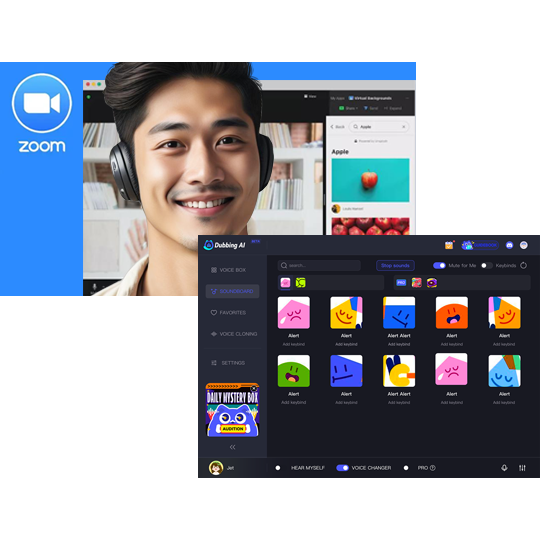
After installation, select your preferred AI voice profile. Most tools allow you to adjust pitch, tone, and intensity. Start with subtle changes. Overly dramatic effects often sound unnatural in professional meetings.
Test your voice using the built-in preview feature before joining a Zoom call. This step alone can prevent most audio issues.
Setting the AI Voice Changer as Zoom Microphone
Open Zoom settings, navigate to the Audio section, and choose the AI voice changer’s virtual microphone as your input device. Speak normally and observe the input meter to confirm the signal is being detected.
At this stage, you are fully prepared to use an AI voice changer on Zoom effectively. In the next section of this guide, we will cover Google Meet setup, advanced troubleshooting, and professional best practices.
Step-by-Step Guide: How to Use an AI Voice Changer on Google Meet
Browser and Desktop Considerations
Unlike Zoom, Google Meet is primarily browser-based, which means audio routing works slightly differently. Most AI voice changers still function seamlessly, but you must ensure your system-level microphone settings are correct before launching a meeting.
For best results, use Google Chrome or Microsoft Edge. These browsers handle virtual audio devices more reliably and reduce the risk of permission conflicts during live meetings.
Connecting the AI Voice Changer to Google Meet
Once your AI voice changer is running:
- Open Google Meet and join or preview a meeting
- Click on Settings → Audio
- Select the AI voice changer’s virtual microphone as your input
Speak normally and confirm that the microphone activity bar responds. If it does, your AI voice changer on Google Meet is ready to use in real time.
Testing Voice Quality Before Joining a Call
Always test your voice before joining an important meeting. Google Meet allows you to preview audio, and most AI voice changers provide real-time monitoring. Adjust clarity and pitch until the voice sounds natural and professional.
In real-world testing, users who spend just two minutes on calibration report significantly fewer interruptions and higher listener engagement.
Comparing AI Voice Changers for Business vs Personal Use
Business-Focused Features
For professional environments, AI voice changers should prioritize reliability and security. Business-grade tools often include:
- Consistent voice profiles for branding
- Encrypted audio processing
- Team or enterprise licensing options
- Priority technical support
These features are especially important for sales calls, webinars, and internal meetings where clarity and trust matter.
Personal and Creator-Friendly Features
Personal users and content creators usually value flexibility and creativity. Common features include:
- Multiple voice presets
- Custom voice tuning
- Quick switching during live sessions
While these tools may lack enterprise-grade security, they are often more affordable and easier to use.
Pricing Models Explained
| Pricing Model | Best For | Typical Cost |
|---|---|---|
| Free / Freemium | Casual users | $0 – $10/month |
| Subscription | Professionals | $10 – $30/month |
| Enterprise License | Businesses | Custom pricing |
Platforms like ai.duythin.digital help users compare these pricing models transparently, ensuring there are no surprises after purchase.
Common Problems and How to Fix Them
Audio Lag or Robotic Sound
This usually happens when your CPU is overloaded. Close unnecessary applications and lower the voice effect intensity. A wired headset also reduces processing delays.
Zoom or Google Meet Not Detecting the Voice Changer
Double-check that the AI voice changer’s virtual microphone is selected in both system settings and the meeting platform. Restarting the application often resolves detection issues.
Poor Sound Quality
Use a quality microphone and avoid extreme pitch shifts. According to audio engineers, subtle voice changes are perceived as more natural and trustworthy.
Best Practices for Using AI Voice Changers Professionally
Optimizing Audio Quality
Maintain a consistent speaking pace, use noise suppression sparingly, and test in advance. Clear communication always matters more than dramatic voice effects.
Knowing When Not to Use a Voice Changer
In sensitive discussions such as legal, medical, or financial consultations, transparency and authenticity should come first. In these cases, using your real voice may be more appropriate.
Transparency Builds Trust
As communication expert Julian Treasure states, “Trust in voice comes from clarity, intention, and honesty.” If you use AI voice modification, disclose it when necessary.
Why Trust AI.DuyThin.Digital for AI Voice Solutions?
Experience and Community Expertise
AI.DuyThin.Digital is built on insights from Vietnam’s leading AI community. Each review and comparison reflects real testing, not marketing hype.
Authoritativeness and Transparency
The platform focuses on detailed feature analysis, real pricing, and practical recommendations. Users save time and reduce risk when choosing AI tools for business or personal use.
Frequently Asked Questions (FAQ)
Can I use an AI voice changer on Zoom for free?
Yes, many tools offer free versions, but advanced features and better audio quality usually require a paid plan.
Does Google Meet allow AI voice changers?
Google Meet supports virtual microphones, making AI voice changers compatible when configured correctly.
Will an AI voice changer affect meeting quality?
When set up properly, the impact is minimal. Poor configuration is the main cause of quality issues.
Is AI voice changing detectable?
High-quality AI voice changers sound natural, but extreme settings may still be noticeable.
Which AI voice changer is best for business meetings?
Enterprise-grade tools with low latency, security features, and consistent voice profiles are recommended.
Conclusion: Is Using an AI Voice Changer on Zoom and Google Meet Worth It?
Using an AI voice changer on Zoom & Google Meet is no longer a novelty. It is a practical tool for privacy, confidence, branding, and creativity. When chosen carefully and used responsibly, it enhances communication rather than distracting from it.
The key is selecting a reliable solution, configuring it correctly, and understanding when and how to use it professionally.
Call to Action
If you want to save time, avoid poor-quality tools, and make smarter AI decisions, explore in-depth reviews and comparisons on
ai.duythin.digital.
Discover the best AI voice changers and AI solutions tailored to your real business and personal needs.